Claude Research on a Team Plan: Time, Limits, Setup
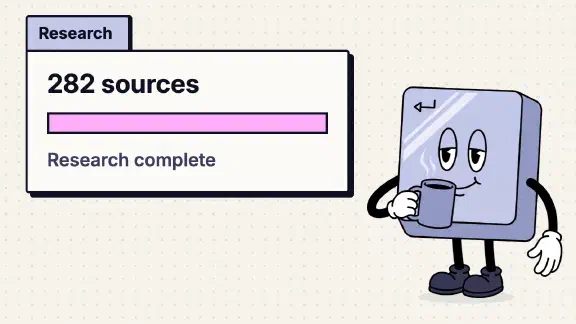
On a Claude Team plan, every member can use Research once web search is on, and web search is an Owner’s switch in Organization settings > Capabilities. A member turns Research on chat by chat from the “+” menu. When I ran it in my company’s Team org on November 12, 2026, it read 282 sources and finished in 3 minutes 28 seconds on a question the public web could answer. Before it started, it asked which of my connectors it was allowed to use. It handed back a document artifact with two mistakes about Team’s settings, so check anything it says about settings against your own Organization settings.
I had Claude in Chrome run the test from my account, as the Primary Owner, and read the settings pages the same day. The rest comes from Anthropic’s help center, read on November 9 and again on November 12, and from the Research lesson in Anthropic’s free Claude 101 course.
| Question | Answer on Team |
|---|---|
| Who can use it | Every member, on the web, Claude Desktop and Claude Mobile |
| What it needs | Web search on for the organization (an Owner) |
| How to start it | “+” > Research in a chat, then send your question |
| How long it takes | Ours: 3m 28s. The course: “a few minutes or more” |
| How much it reads | Ours: 282 sources |
| Your connectors | It asks which ones each run, unless you tick “Always allow” |
| On a phone | Web only. Connectors are skipped, with no warning |
| Usage | The member’s own limit, used up faster than a normal chat |
| What you get | A document artifact |
How do I turn on Claude Research on a Team plan?
The Owner’s part is web search. Anthropic’s Research page says it plainly: “You must have web search turned on for research to function.” On Team, web search is under Organization settings > Capabilities, and an Owner or the Primary Owner sets it. In our org it reads on, labeled “Set by admin,” which means someone switched it at some point, so I can’t tell you what a brand-new Team org starts with. Anthropic’s web search page says an Owner “must first enable” it. Look at yours. I found no separate Research switch for the organization.
The member’s part is one click. In a new chat, open the “+” menu. In our org its last four rows are switches: “Ask [your org’s name],” “Research,” “Web search” and “Memory.” Turn on Research, type the question and send.
That menu may change soon. Our Capabilities page shows “Chat and Cowork unified” as off, with “Will be automatically enabled on December 1, 2026.” Anthropic’s web search page says that in the new experience “there’s no web search toggle. Claude searches the web when it helps,” and its help center says Research then starts from “/deep-research” or “+” > Research. If the switch you expect is gone after December 1, try /deep-research.
What does Research ask before it starts?
Which connectors it may use. When I sent the question, a dialog came up: “Enable connectors for Claude to use in research.” It listed my connectors with a switch each, plus “Disable all tools,” a box reading “Always allow 2 selected connectors” (off), a warning (“Ensure you have appropriate permissions and trust third-party tools before continuing”) and two buttons, “Skip” and “Confirm.” I clicked Skip, to keep the test to public sources.
Anthropic’s page describes the next step: “During research, Claude can use tools from your connectors automatically, without asking for approval each time.” Put the two together and a run works like this: you pick the connectors once, at the start, and within the run Claude uses their tools without asking again. Tick “Always allow” and, going by the box’s label, Research stops asking about those connectors. For anything with client data in it, I’d leave that box unticked, so every run starts with a decision about what it can read.
The connector has to exist before Research can use it. On Team an Owner adds each one for the organization, and each member then signs in with their own account. If a teammate is staring at a greyed-out connector, the ask-your-admin post covers what the Owner has to do.
How long does Claude Research take?
Ours took 3m 28s. Eight seconds in, the card read “28 sources and counting,” and it ended at “Research complete · 282 sources · 3m 28s.” That was a public-web question with no connectors, so one data point, on the light end.
Anthropic’s Research page gives no time. The Claude 101 lesson says “a few minutes or more, depending on the question,” and Anthropic’s launch post from May 2025 says “most reports complete in five to 15 minutes, Claude may take up to 45 minutes for more complex investigations.” Plan for the longer end when connectors are in the mix and the question is broad. I didn’t test whether a run survives closing the tab, so I’d leave it open.
What does Research produce?
A document. Ours came back as a Document artifact titled “Claude Team Pre-Course Checklist.” It starts private to you, like every artifact, and you share it the same way (who can see a shared artifact).
Where Claude’s Research got Team wrong
I asked it what an Owner should switch on before staff take Claude 101. Most of the answer held up against the live org: web search needed for Research, code execution, Skills, Cowork, memory and the artifact templates on by default, the one-time consent a Microsoft 365 tenant’s Global Administrator has to give, and email invitations outside the organization on by default.
Two claims were wrong on the day I checked:
- “External artifact sharing … on by default.” On our Artifacts page, External sharing is off, labeled “Default.” What is on by default is the separate “Email invitations outside your organization.” Anthropic’s sharing page says artifacts “stay inside your organization by default,” so Research mixed up two settings that sit next to each other.
- The path to add a connector. It said Organization settings > Connectors > Browse > “Add to your team.” The live page reads Connectors > “Add” > “All available.” Research didn’t invent the old path: Anthropic’s connectors page still said “Browse connectors” and “Add to your team” on November 12. The help center is behind the product.
It also paraphrased the course’s own line about admins. The course page says “your admin controls whether designs, decks, and documents are available,” and Research turned that into an admin who “may need to turn these on.” Small, but it’s the kind of drift to watch for in any report about settings.
To its credit, it warned me itself: “Help Center pages disagree on some Team defaults, so it’s worth checking each setting yourself.” That’s the right use of Research for an Owner. It’s a fast first draft of what to look at, with links. The answer about your org is on your Organization settings pages.
Why is Claude Research not working?
| What you see | Likely cause | Fix |
|---|---|---|
| Research doesn’t run | Web search is off for the organization, or in that chat | Owner: Capabilities > Web search. Member: the “Web search” switch in “+” |
| No Research switch in “+” | The new unified experience | Type /deep-research |
| It ignored your Drive, Slack or Notion | You started it on a phone | Start it on the web or in Claude Desktop |
| Same, on a computer | You clicked Skip, or the connector isn’t added or connected | Pick the connectors in the dialog; ask your Owner to add the missing one |
| It ignored a local tool in Claude Desktop | Research “can’t use tools from local MCP servers” | Use a connector added in claude.ai instead |
| It answered without researching | Claude decided not to | Anthropic’s suggestion: start with “Claude, please use the research tool to…” |
| It stopped at your limit | Research spends the member’s own limit faster | See below |
The phone row is the one that catches people. Anthropic’s page: “When you start research in Claude Mobile, Claude only searches the web and doesn’t use your connectors. You won’t see an error or other sign that your connectors were skipped.” A report built on public pages looks just as confident as one built on your files.
The help center also says Research won’t work if an admin turned off both models it runs on “for your role.” Anthropic’s model access settings are an Enterprise feature, so on Team I’d look at the other rows first.
Does Claude Research use up my limit?
Yes, and faster than a normal chat. Anthropic: “Research is subject to the same limits as standard Claude conversations. However, research sessions can use up your limits faster due to Claude retrieving multiple sources and providing comprehensive responses.” It gives no number for how much faster. On Team, limits belong to each member and can’t be pooled, so one person running Research all afternoon spends only their own allowance.
If someone hits the wall often, the Owner has two levers. Organization settings > Usage in our org has “Turn on usage credits” (“Users can use Claude after exceeding their rate limit with usage-based pricing”) and “Usage credit requests” (“Let team members request usage credits when they reach their limits”). Set a monthly spend limit on the same page first. The other lever is a Premium seat for the person who researches all day (who needs Premium).
Research or “Ask [your org]”?
They sit next to each other in the “+” menu and do different jobs. “Ask [your org]” is enterprise search: it looks through your company’s connected tools to find what you already have. Research goes wide, mostly on the public web plus any connectors you allow, and writes a report. A question like “where’s our engagement letter template” is enterprise search. “What changed in our state’s rules for contractor classification this year, and which of our clients does it touch” is Research with your files allowed. Setting up enterprise search is an Owner’s job, covered in the owner’s side of Claude 101.
What I couldn’t confirm
- Whether an Owner’s “Needs approval” setting holds during Research. Anthropic says Research uses connector tools without asking. I didn’t test whether a tool an Owner set to “Needs approval” still asks during a run, because that means a run against real data.
- Team’s default for web search. Ours reads “Set by admin.”
- A run with connectors. I skipped them, so I can’t say how much longer a run takes with your Drive or Slack in it.
- Closing the tab, or hitting the limit mid-run. The Research article doesn’t cover either, and I didn’t try them. Anthropic says tasks in the new unified Chat and Cowork experience “keep running in the cloud even if you close your laptop or leave the page,” and that reaches our org on December 1.
- “Always allow” and the Owner’s switch. The dialog offered “Always allow” while our Capabilities page had Allow “Always allow” for connector tools off (Default). I didn’t test whether that switch governs the Research checkbox.
- What a new member sees. I ran it from the Owner’s account. A member’s “+” menu should match, but I didn’t sign in as one.
What should I do next?
If you’re the Owner, open Organization settings > Capabilities and confirm web search is on, then tell the team two things: start Research on a computer when it needs your files, and check anything it says about your own settings. Then score the rest of your org with the ten-question team check.
If you’d rather have it done, my setup starts at $3,997 for one team of up to 25, and you pay for your own seats. One job live on your real work by day 14, or all your money back. It connects the tools Research should read and sets what each one may do.