AI Note Taker Privacy: 46 Transcripts Got Past Our Gate
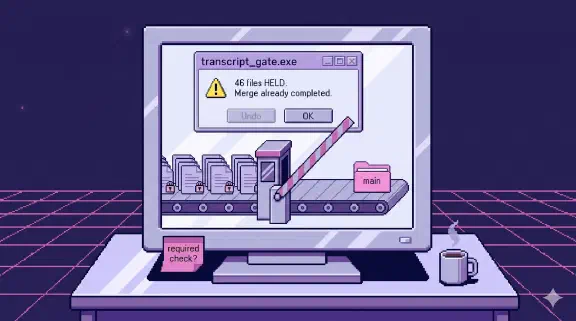
Two days after we shipped a four-layer confidentiality gate for meeting transcripts, a documentation pull request merged 46 transcripts that gate would have held. The gate itself worked fine. It just wasn’t standing anywhere the pull request had to pass.
If you’re deciding whether an AI note taker is safe for confidential meetings, the three rules I’d give you are at the end. The rest is how we learned them.
I’ll describe what was in those files in categories only, for reasons that will be obvious.
Why transcripts are the dangerous part of a company brain
Our company brain is a git repo that Claude Code reads and writes. Emails, docs, call notes and meeting transcripts all live in folders per client, and a search index sits on top so anyone on the team can ask a question and get an answer with sources. As of October 2026 it holds 727 transcripts.
Transcripts are the richest source in there and the riskiest by a wide margin. An email is written to be read by someone else. A meeting is people talking, and people say things out loud they would never type: a raise that hasn’t been announced, a health issue mentioned in the five minutes before the agenda starts, a password read off a screen so a colleague can log in. A transcription bot captures all of it with equal enthusiasm.
The old job that pulled transcripts into the repo had none of this in mind. It also clipped every transcript at 6,000 characters, which is about a tenth of an hour-long call, and when it couldn’t reach its source it logged a warning and reported “nothing to sync” forever. It never crashed. It was confidently and silently wrong, and that turned out to be the pattern I had to design against.
The gate we built
In late September we rebuilt the ingest as an hourly cloud job, with four layers between a recording and the repo:
- Attendee routing. A meeting with zero external attendees is held, no model call involved. Internal identity comes from the team roster, never from email domains, because personal Gmail addresses show up in about twenty of our contact records and routing on them would spray one client’s call across every folder with a Gmail contact.
- A word-list scan. Deterministic, bilingual, standard library only. It reports a category, a line number and a rule. It never stores the matched text.
- An LLM classifier that can only hold. It holds on sensitive content, and it also holds on uncertainty, low confidence, timeouts, API errors, malformed output, refusals and truncation. There is no path where the model releases something the earlier layers flagged.
- A CI re-scan on every pull request that adds a transcript, whoever adds it. This is the one layer that doesn’t depend on a model behaving correctly.
The most useful thing I learned building it: seven defects turned up just from running the code, and five had the same shape. An empty roster, a bad config value, a result object created with no arguments. Each one quietly produced a CLEAN verdict. In a pipeline that’s supposed to fail closed, a defensive default is a bug unless it defaults to HOLD.
We also wrote the leak runbook before go-live, while the failure was still hypothetical. That felt a bit paranoid at the time.
How 46 transcripts got around it
The ingest job wasn’t the problem. The job was in shadow mode, committing nothing.
The leak came through the side door. Transcripts had also been committed by hand into client folders on a working branch, outside the job, and they rode along in a big docs pull request with scoping notes and reference pages. Our repo has a docs lane where documentation-only PRs auto-merge. That one auto-merged 53 seconds after it opened, three seconds after the docs bot approved it.
The CI re-scan (layer 4) existed. It had a path filter, and it wasn’t a required check. GitHub’s auto-merge fires once the required reviews and the required status checks pass, and a check that isn’t required doesn’t count. So the merge went through before the scan had even started. Our auto-merge rules had surprised us once before, the night two bots argued on a pull request for 21 hours.
When we ran the scan locally afterwards, it held all 46 files. The flags fell into three categories: staff compensation and employment details, private personal information, and four transcripts containing what looked like credentials.
Can you remove a leaked file from git history?
Only partly. We removed the files from main sixteen minutes after the merge. They stayed on disk and on the working branch, so nothing was lost for the people who were entitled to it.
And they’re still in git history. This is the part people underestimate. git rm removes a file going forward. Every earlier commit still contains it, GitHub serves the old objects by SHA, and the pull request page has its own copy of the diff. Actually purging it means a history rewrite and a force-push against a protected branch (which breaks every open branch cut from that range), plus a support request to GitHub for the cached objects and the PR page. GitHub’s own guide to removing sensitive data lists the same places the commits survive a rewrite (clones, forks, cached views by SHA, pull requests that reference them), and says Support only helps when rotating a credential can’t fix the problem. That works for the four transcripts with credentials. You can’t rotate a colleague’s salary. And if your search index already ingested the files, it keeps answering questions from them until you reconcile it too.
The repo is private and the audience was the team, which is why this was an incident and not a disaster. But “only the team can see it” is exactly the problem when the content is a colleague’s compensation.
The fixes
Five days later the gate became a required status check on every PR. We dropped the path filter, because a required check that only runs on some paths never reports on the others and blocks every PR forever. That’s documented behavior: GitHub’s workflow syntax docs say a workflow skipped by a path filter leaves its checks “Pending,” and a pull request that requires them is blocked from merging. On a PR with no transcripts it runs a self-test and passes in seconds. The override is a transcript-reviewed label, because a human applying a label is an auditable act and a commit message isn’t.
Then we closed the side door. Day-end no longer writes transcripts to paths it derives from meeting titles. Everything goes through one filing script that runs the same content scan, files clean transcripts and parks held ones in a gitignored folder. Never into the tracked tree, either way.
What the gate costs
The ingest ledger has 110 rows so far. 104 held, 5 errored, 1 cleared, and that one was in shadow mode. The hourly commits read “0 would file, 2 held” over and over. In the first five days, 20 of its 21 commits said 0 would file.
Most holds are routing, not content: 41 meetings had no attendee list, 29 were internal only, 16 had no matching client folder, 9 matched more than one client. Those are cases where the system can’t prove where a transcript belongs, so it refuses to guess.
That’s annoying. It means people still file a lot of meetings by hand, through the gated script. I’ll take it. A held transcript costs someone a few minutes of filing. A misfiled one puts one client’s call in another client’s folder, which our runbook treats as the same incident as a leak, because it is.
The other cost is invisible loss. A held transcript looks identical to a meeting that never happened. So day-end now reads the ledger and lists every held meeting in its window, by category code only. If you build a gate, build the report of what it stopped.
Leaks that aren’t files
Transcripts are the loud case. The quieter one is the brain carrying knowledge from one client into another client’s work.
Every lesson in our learnings store has a client_safe flag. A learning from one client never shows up in another client’s materials unless it has been generalized first. And before anything leaves the company (proposals, decks, and every drafted email), a leak-check pass reads it as the recipient would, looking for seven categories: other clients’ identities, internal economics, legal identifiers, credentials, stale commercial language, negotiating position, and things a third party told us in confidence. The same check runs on every email our AI drafts, which a person still sends by hand.
None of this is exotic. It’s the same discipline a careful person applies before forwarding an email. The difference is that a company brain forwards things at machine speed, so the care has to be built into the path instead of remembered.
What I’d tell you before you connect your meetings
Put the check where the content has to pass, and make it required. A safety layer that runs next to the path is a report, and you’ll read it after the merge.
Default to holding on anything ambiguous, errors and timeouts included. Then build the list of what got held so a human can clear it.
Write the cleanup runbook before you need it, and include git history and your search index in it.
This is one reason the company brain I describe here spends so much of its code on governance. Email raises the same questions, and I put our checklist for it in Can Claude Read My Email?. Finance tools raise them with money attached, which is why I wrote a connector policy for QuickBooks. Law firms live with the strictest version of all this, since client confidentiality limits what data their AI can touch, and I wrote about how they’re adopting AI anyway.
If your first question about a company brain is who gets to see what, start there. Book a free 30-minute call, bring one question your team asks every week, and we’ll go through which of your files the answer would need and who should be allowed to read them.