How to Remove Claude's Access to Google Drive, Gmail and Folders
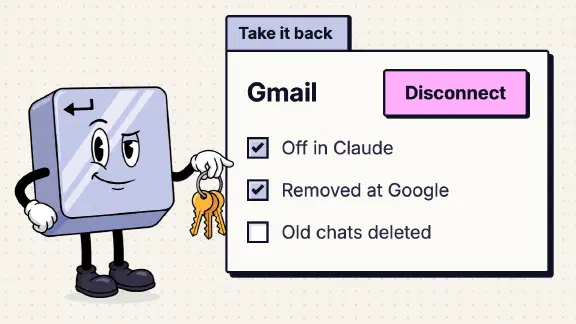
To remove Claude’s access to an app, cut it off on both sides. In Claude, go to Customize, then Connectors, select the app and choose Disconnect. Then remove Claude from the app’s own list of connected apps: Google’s connections page for the Google apps, My Apps or your Microsoft account for Microsoft 365, Manage apps in Slack, Settings, Applications in GitHub. Last, delete the chats that pulled in anything sensitive, because what Claude already read stays with the chat. A folder on your computer and Claude Code each work differently, and both are below.
Why both sides: Anthropic’s Microsoft page says that after you disconnect a personal Microsoft account, “The permission you gave Claude stays active in your Microsoft account until you remove it there.” Its Google and Slack pages don’t say either way, so treat them the same.
These steps come from Anthropic’s, Google’s, Microsoft’s, Slack’s, GitHub’s and Apple’s help pages, read on November 13, 2026. Menus move, so if a label below doesn’t match your screen, look for the same words nearby.
| What Claude can reach | Turn it off in Claude | Remove it on the other side |
|---|---|---|
| Google Drive, Gmail, Google Calendar, Docs, Sheets, Slides | Customize, Connectors, the app, Disconnect | Your Google linked apps page, Claude, See details, Remove all access |
| Microsoft 365, work or school account | Customize, Connectors, Microsoft 365, Disconnect | My Apps, Manage your application, Revoke Permissions |
| Microsoft 365, personal account | Customize, Connectors, Microsoft 365, Disconnect | Your Microsoft account’s app access page, Claude, Remove these permissions |
| Slack | Customize, Connectors, Slack, Disconnect | Manage apps, Installed Apps, Claude, Configuration, See all, Revoke |
| GitHub | Customize, Connectors, GitHub Integration, Disconnect | Installed GitHub Apps and Authorized GitHub Apps |
| A folder on your computer | End the task, quit Claude Desktop | Mac: Privacy & Security, Files & Folders |
| Claude Code’s tools | claude mcp logout, then claude mcp remove | The app’s own connected-apps page |
Show the data
| Where | What you do | What it stops | What it doesn’t reach |
|---|---|---|---|
| In Claude | Customize, Connectors, the app, Disconnect | Claude’s access from now on | The grant at the app, which may stay; what your chats already hold |
| At the app | Remove Claude at Google’s linked apps, Microsoft’s My Apps or app access, Slack’s Manage apps, GitHub’s Settings, Applications | The permission you gave Claude | What your chats already hold |
| In your chats | Delete any chat that pulled in something sensitive | What Claude already read, once Anthropic’s storage drops the chat | Chats flagged or sent as feedback; Claude Duet’s memory |
How do I disconnect an app in Claude?
Open Customize, then Connectors and select the app under Your connectors. You get two choices, and Anthropic’s Drive page spells out the difference:
- Disconnect “sign[s] Claude out” of the app. The connector stays in your list and shows Connect, ready for next time.
- Remove, in the three-dot menu, takes the connector off your account.
Disconnect is what cuts access. Remove also tidies the list. Turning a connector off for one chat (the + button, then Connectors) is neither: it hides the app from that one conversation.
On Team and Enterprise, each person connects their own account, so each person disconnects their own (unless your organization authorized the connector once for everyone with Enterprise-managed auth). An Owner who wants it gone for everyone turns the connector off in Organization settings, then Connectors. Anthropic’s Microsoft security guide describes that switch as “all team members affected.”
How do I remove Claude’s access to Google Drive and Gmail?
- In Claude, open Customize, Connectors, pick Google Drive (or Gmail, or Google Calendar) and select Disconnect. Anthropic’s Google page has you confirm with a second Disconnect. Drive, Gmail, Calendar and the Docs, Sheets and Slides editing connectors are separate connectors, so do each one you connected.
- Open your Google Account’s linked apps page and select Claude. Under “Claude has some access to your Google Account,” select See details, then Remove all access. Delete all, on Claude’s page, also removes a Sign in with Google link if you have one. Google’s help says that once access is removed, “the app can’t access your Google Account.” I read those labels on November 13, 2026, on another app’s page, since the account I checked hasn’t connected Claude; Google’s help still says “Remove access” and Anthropic’s says “Delete all connections.”
- Delete the chats that pulled in anything you’d rather Claude didn’t keep (more below).
Gmail has its own page: how to disconnect Claude from Gmail. If you run Google Workspace and want to see or block Claude for the whole company, start with the admin steps in Is It Safe to Connect Claude to Google Drive?
How do I remove Claude’s access to Microsoft 365?
Disconnect in Claude first, the same way. Then it depends on the account.
- Work or school account. Open My Apps, hover over Claude, select Manage your application, then Revoke Permissions. You can revoke only what you consented to yourself. What your administrator approved for everyone sits in the bottom half of that window, and only the admin can take it back, in Entra. The admin steps are in Is It Safe to Connect Claude to Microsoft 365?
- Personal account. Open your Microsoft account’s app access page, the one Anthropic’s page links to, select Claude, then “Remove these permissions”. This is the grant Anthropic says stays active until you remove it there.
How do I disconnect Claude from Slack?
Claude comes in two forms in Slack, and each disconnects in its own place:
- The Slack connector (Slack inside claude.ai): Customize, Connectors, Slack, Disconnect.
- The Claude in Slack app (Claude inside Slack): open Claude in your Slack sidebar, go to its Home tab and select Disconnect.
Anthropic says disconnecting “deletes past conversations within 30 days.”
On the Slack side, open Tools & settings, Manage apps, Installed Apps, then Claude, App Details and the Configuration tab. Slack’s help has you find Authorized members under Authorizations, select See all, then Revoke next to the person. Remove App on the same tab takes it out of the workspace for everyone. If you can’t see either option, your Workspace Owner has restricted who can remove apps, so ask them.
How do I disconnect Claude from GitHub?
In Claude, open Customize, Connectors, select GitHub Integration and disconnect it. Private repositories also reach Claude through the Claude GitHub App, so finish on GitHub:
- Take away its repositories. Settings, Applications, Installed GitHub Apps, then Configure next to Claude. Narrow it to specific repositories, or suspend or delete it. GitHub says that blocks “its access to resources owned by the account where it is installed.” For an organization, the same list is in the organization’s settings under Third-party Access, GitHub Apps.
- Revoke your authorization. Settings, Applications, the Authorized GitHub Apps tab, then Revoke.
An organization owner can’t revoke a member’s authorization: “The authorization can only be revoked by the person who authorized the GitHub App.” The owner can uninstall the app from the organization, which shuts it out of the organization’s repositories even if the member never revokes.
Repositories already added to a Claude project lose their preview once access ends, but the conversations stay. Delete those if the code was sensitive.
How do I remove Claude’s access to a folder on my computer?
Claude Desktop and Cowork reach your computer only for the folders you’ve connected, and only while the Claude Desktop app is open. That gives you the surest switch: end the task and quit Claude Desktop. Then take the folder off:
- Remove the folder in the task or project where you added it.
- On a Mac, turn Claude off for that location under System Settings, Privacy & Security, Files & Folders. This covers Desktop, Documents and Downloads.
- If the folder won’t come off, move the sensitive files out of it. Claude only reads and writes inside folders you’ve connected.
Step 3 is there because removing a folder is rough right now. I found no Anthropic page that explains it. A user’s report on Anthropic’s GitHub, open since March 2026, says a folder added to a Cowork project has “no way to remove it from within the UI.” Another says that once a folder is connected to a running session, removing it in the app and in macOS “has no effect on that session” until the conversation ends. Those are one person’s reports each, but they’re why I’d quit the app rather than trust the remove button. Next time, follow Anthropic’s own advice and connect a dedicated working folder instead of Documents or your whole drive.
Two more things live on your computer:
- Desktop extensions (local tools you installed into Claude Desktop) are under Settings, Desktop app, then Manage next to Extensions. Remove the ones you don’t use.
- The camera. On a Mac, System Settings, Privacy & Security, Camera, and turn Claude off.
How do I remove Claude Code’s access?
Claude Code keeps its own connections, separate from claude.ai’s.
- A tool it signed in to (an MCP server): run
claude mcp logout <name>, thenclaude mcp remove <name>. Order matters. Anthropic’s docs say removing a server deletes the tokens Claude Code stored, but “Claude Code doesn’t revoke the tokens at the authorization server that issued them.” Logging out first does, where the service supports it. Inside a session, “Clear authentication” in the/mcpmenu does the same. Then check the app’s own connected-apps page anyway. - Folders. Claude Code reads the folder you started it in, plus any you added with
--add-dir,/add-diroradditionalDirectoriesin a settings file. The settings entry is the one that comes back every session, so delete folders you don’t want there. - Permissions you granted.
/permissionslists every rule and the settings file it came from. Remove the “always allow” rules you no longer want. - The whole account. Type
/logout.
If you installed the Claude GitHub App so Claude Code could work on pull requests, remove it on GitHub as above.
What happens to what Claude already read?
Disconnecting stops new access. It doesn’t reach back. What Claude retrieved is stored on Anthropic’s servers with the chat, so delete the chats you don’t want kept. Deleted chats leave Anthropic’s back-end storage within 30 days, unless they were flagged or sent as feedback. Cowork tasks delete the same way, from the ⋮ menu next to the task.
If you use Claude Duet, also reset its memory. Anthropic says disconnecting an app stops Duet’s access, “but memory of past information from earlier conversations is kept.”
How do I disconnect Claude from other apps?
Each safety post has the steps for its app, including the app’s own side:
- Google Drive, Gmail and Google Calendar
- Microsoft 365 and Slack
- HubSpot and Shopify
- QuickBooks, Xero, Stripe and Gusto
- Dropbox
When someone leaves the company, do both sides for every app they connected, the same day you remove them. What happens when someone leaves your Claude Team has the rest of that checklist. The one-page connector policy keeps a list of who connected what, so there’s something to check against.
What I couldn’t confirm
- Whether Claude’s Disconnect revokes the grant at Google, Slack or GitHub. Anthropic says it doesn’t for a personal Microsoft account, and Claude Code’s docs say removing a server doesn’t. The other pages are silent, so remove it on both sides.
- How to take a folder off a Cowork project. I found no Anthropic page that explains it.
- Whether Claude Code’s GitHub App has the same name as claude.ai’s. Look for any app from Anthropic in the list.
What should I do next?
Open Customize, Connectors today and disconnect anything you haven’t used this month. Then open your Google, Microsoft and GitHub connected-apps pages, because they also show grants you made to other AI tools and forgot about. For the rest of your Claude setup, score it with the ten-question team check.
Sources for the facts on this page, checked November 7, 2026: How long do you store my organization's data?.