Can I Put Client Data Into Claude?
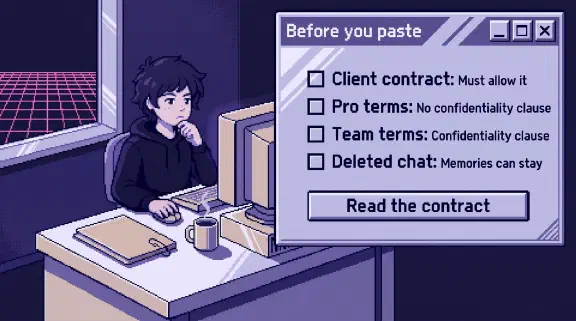
Yes, if the client’s contract allows it, you’re on Claude Team or Enterprise, and the data isn’t a kind that needs more than that. All three have to hold, and the training setting is the smallest part of it.
Anthropic’s own documents held two surprises. The word “confidential” appears nowhere in the Consumer Terms, so turning off training on Pro doesn’t get you a confidentiality promise. And on the current memory setup, deleting a chat doesn’t delete what Claude remembered from it.
I haven’t tested these settings with client documents. This comes from public pages I read on October 31, 2026, and it isn’t legal advice. I set up Claude Team for small companies, so I have a stake in the plan question.
Does my client’s contract or NDA allow it?
No setting in Claude answers this. On every plan, you promise Anthropic the material is yours to submit. The Commercial Terms say the customer “has all rights and permissions required to submit Inputs to the Services.” The Consumer Terms ask the same of you personally. If the client’s contract says no, one paste breaks it and makes that promise false.
Read the contract for four things. The wording below comes from one public template, Common Paper’s standard mutual NDA. Yours will differ.
| Look for | Example wording | What it means for Claude |
|---|---|---|
| What you may use it for | “solely for the Purpose” | Summarizing their contract for their project fits. Building your firm’s templates from it probably doesn’t |
| Who may receive it | “employees, agents, advisors, contractors and other representatives having a reasonable need to know” | Anthropic has to fit this list. If yours stops at employees, ask first |
| Rules on AI or subprocessors | Some contracts name these outright | A ban ends the discussion. A notice requirement means you tell them first |
| Return or destroy | “destroy all Confidential Information”, and “confirm its compliance with these obligations in writing” | You may have to sign something saying it’s gone |
Personal data has one more rule. If you handle it on the client’s instructions, you’re usually their processor, and GDPR Article 28 says “The processor shall not engage another processor without prior specific or general written authorisation of the controller.” Anthropic’s Data Processing Addendum calls you “the controller” and itself your “processor”. Your agreement with the client decides whether Anthropic can be added and how.
A contract that says nothing about AI isn’t a yes. Asking takes one email.
Is a Claude Team plan enough for confidential information?
It’s the minimum I’d use, and it settles only the plan question. Here is what changes, from the terms above, Anthropic’s commercial and personal training articles, and its custom retention page:
| Free, Pro, Max, Ultra | Team | Enterprise | |
|---|---|---|---|
| Training | A setting you choose, except chats flagged for safety review | “Anthropic may not train models on Customer Content” | Same as Team |
| Confidentiality clause | None in the terms | “Customer Content is Customer’s Confidential Information” | Same as Team |
| Data Processing Addendum | Not mentioned in the terms | Part of the Commercial Terms | Same as Team |
| Who can export everything | Only you | The Primary Owner | The Primary Owner, plus Compliance API access |
| Custom retention | No | No | Yes, 30 days minimum |
The second row is why I’d say no to client work on a personal plan, even with training off. Under the Commercial Terms, Anthropic can share your content only with people who need it and are bound to confidentiality, or where the law compels it. It must destroy it on request, apart from backups and what the law requires it to keep. If your NDA says the people you share with must be bound to confidentiality, you point to that clause. On Pro, the terms give you nothing to point to.
Those promises run to your firm. Your client gets nothing directly from Anthropic, so your contract with them still carries the whole risk.
Watch the export row. On Team, one person can export every client’s chats and uploaded files, minus what’s been deleted. What your employer can see covers who that is.
One exception to the training line: thumbs up or down feedback stores the “entire related conversation” for up to 5 years and can be used for training. An owner can switch rating off, and on client work I would.
If I delete the chat, is the client’s data gone?
Less than you’d think. On company plans, Anthropic says “we retain your chats and coding sessions in the product” until someone deletes them, then they’re “Deleted from our back-end storage systems within 30 days.” Chats flagged for a policy violation can stay up to 2 years, rated chats up to 5, and longer where the law requires. Custom retention is Enterprise only, so on Team, deletion depends on someone remembering.
Check four places before you sign a destruction letter:
- Memory. Anthropic’s guide says “When a conversation is deleted, including under a retention period, memory entries generated from it aren’t removed, but you can delete individual memories while memory is on.” Owners “can’t view or edit a user’s individual memories”, so ask whoever did the work. On Team, memory is off for each member until they turn it on. If your settings still show the older “Generate memory from chat history” option, the guide’s older section applies instead: “Deleted conversations are removed from memory synthesis.”
- Departed staff. “Removing a user from your organization doesn’t delete their account or data.” An owner has to ask Support, in writing.
- Downloads. Deleted data drops out of later exports. An export already on someone’s laptop stays there, and so does any Word or PDF file saved from a chat.
- Projects. “Project memory is deleted when the project is deleted”, so delete the whole project at the end. An archived project has to be unarchived first.
Will Claude mix up my clients’ data?
It can, if the work sits outside separate projects. Anthropic’s guide says that inside a project Claude uses the project’s memory “alongside your memory from chats outside of projects, but not memory from other projects.” The crossover runs through loose chats: “New memory is saved to the project, and if you have memory turned on, Claude can reference it in chats outside of projects too.” Chat search draws the same line. So a fact from one client’s project can turn up in a loose chat where you’re drafting for another.
For client work, I’d use one project per client, set to “Keep it private”, with “Use account memory” turned off on each project’s page. Or an owner can turn memory off for the whole organization under Organization settings, then Capabilities. That permanently deletes everyone’s existing memory right away, so warn people first.
Our runbook counts a transcript filed in the wrong client’s folder as the same incident as a leak. We also shipped a gate for transcripts, and two days later 46 of them, committed by hand, merged past it in a docs pull request. So make the safe setting the default.
What kind of client data should stay out of Claude?
The data itself can settle it, even with a clean contract and the right plan.
| Kind of data | On Team |
|---|---|
| Ordinary confidential business documents | Fine, if the contract allows it |
| Personal data about the client’s staff or customers | After the subprocessor check, with anything Claude doesn’t need removed |
| Health information covered by HIPAA | No. Team can’t enable HIPAA, and the SOC 2 post has the routes that can |
| Tax return information | Ask counsel first. The bank statements post has the rule, and how to redact properly |
| A lawyer’s client matters | The lawyer’s call, under their bar’s rules (below) |
| Passwords and API keys | Never. If one gets pasted, change it |
Connecting a client’s system widens all of this. The table of what 33 connectors can change shows how far.
What should I tell a client about using Claude?
Tell them before the first paste, and get the answer in writing. Change this to match what you do:
We’d like to use Claude, an AI tool from Anthropic, on your project, to [summarize the documents you send and draft first versions]. We use a company [Team] plan, and Anthropic’s commercial terms say it may not train its models on our content. [Name] at our firm can export our account’s data. We’ll delete your material from Claude [when the project ends], and we won’t put in [passwords, health records, your employees’ personal details]. A person here checks everything before it reaches you. Does your contract or AI policy allow this, and do you need Anthropic listed as a subprocessor?
For lawyers, ABA Formal Opinion 512 says that when consent is required, “merely adding general, boiler-plate provisions to engagement letters purporting to authorize the lawyer to use GAI is not sufficient.”
Some work requires disclosure whatever the contract says. Anthropic’s Usage Policy lists high-risk areas, including legal, medical, finance, insurance and employment, each with its own narrow definition. When Claude’s recommendation feeds advice or a decision about a person in those areas, a qualified person must review it, and the individual affected “must be clearly told that AI was used to produce it.” You don’t have to name Claude. That wording takes effect November 12, 2026, and Anthropic says the requirements themselves “haven’t changed.”
What I couldn’t confirm
- Whether an Owner on Team can delete a current member’s chats. The docs describe members deleting their own, and Support deleting a removed user’s.
- Whether uploaded files and project knowledge follow the same 30-day clock as chats, and whether deleting a project by hand takes its chats with it. The retention pages say chats and conversations, and the projects guide lists only the steps.
- Whether a lawyer needs client consent on a plan that doesn’t train on content. The ABA opinion requires it for “self-learning” tools and names no product, so ask your state bar.
What should I do before I paste this document?
Read those four clauses in the contract. If it’s silent or unclear, send the message above and wait. Then move the work onto a company seat, into a private project for that client, and write the rule down. The one-page connector policy already keeps anything a contract calls confidential out until someone who owns the risk signs off.
If you’d rather plan which of your tools to connect, and how, the setup planner asks six questions and gives you a plan without asking for an email. If you want a second look at a client contract’s AI question before you answer it, bring it to a 30-minute call.