Is Claude Code Safe to Use?
Yes, if you treat it as a program running under your own login and you choose who approves its actions. The default approver may not be you. The name suggests a tool that edits code in one folder, but Anthropic’s docs say it can run “Any command you could run”.
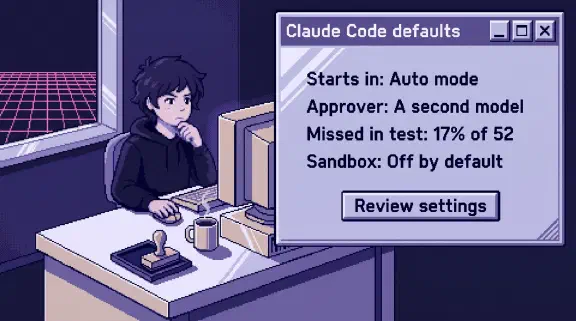
Since late September, new terminal and VS Code sessions start in auto mode on every plan. In auto mode, a second model reviews actions instead of you. In Anthropic’s own evaluation, that model let through 17% of a small set of real overeager actions. And the folder limit people assume is, in Anthropic’s words, “a permission prompt.”
My company runs on Claude Code, but some of this I’ve only read:
- Documented in our own posts: hooks, shared read-only allow rules and secrets in a gitignored file, and
CLAUDE.mdrules. - Anthropic’s docs only, read October 31, 2026: auto mode, Manual mode, bypass mode, the sandbox, dev containers, deny rules, managed settings and zero data retention.
I set up Claude Team for small companies, so I have a stake in the plan question. Nothing here is legal advice.
What can Claude Code access on my computer?
Whatever your user account can reach. Anthropic’s overview lists your project folder, “plus files elsewhere with your permission,” and your terminal: “If you can do it from the command line, Claude can too.”
The security page says “a Bash command you approve can still write anywhere your user account can.” Bash here means a terminal command.
Auto mode is looser about reads outside the folder. They “run without a prompt”, except that you get asked once, the first time Claude’s file tools try it. Answer “Yes, and keep allowing” and that question is gone for good. Answer “No, and block reads outside the working directories from now on” unless you have a reason not to.
Claude Code’s transcripts are plaintext: “Anything that passes through a tool is written to a transcript on disk: file contents, command output, pasted text.” Terminal transcripts stay for 30 days by default. Desktop ones have no age limit.
Is Claude Code safe on a personal computer?
Safe enough for your own projects, but I wouldn’t do company work from the same login. Your SSH keys, your tax returns and your company’s repo all sit behind the one account Claude Code runs as. If one machine has to do both, give work its own user account.
Does Claude Code ask before it does anything?
Not by default anymore, and you get one notice the first time it happens. Here’s what runs without asking:
| Mode | Runs without asking | Anthropic says it’s best for |
|---|---|---|
Manual (default) | Reads only | “sensitive work” |
| Auto, the starting mode | “Everything, with background safety checks” | “Long tasks, reducing prompt fatigue” |
| Bypass permissions | “Everything” | “Isolated containers and VMs only” |
Auto mode blocks a lot by default, including curl | bash, “Sending sensitive data to external endpoints” and force pushes. Anthropic’s docs still warn that it “does not guarantee safety.”
The engineering post from March is blunter. On 52 real actions where Claude overreached, the classifier let 17% through. Anthropic calls that “the honest number.” For someone otherwise running with permissions skipped, it says this “is a substantial improvement.” For someone carefully approving every action, “it’s arguably a regression.” And: “It is not a drop-in replacement for careful human review on high-stakes infrastructure.” Six months later it became the starting mode on every plan.
Prompts fail too. The same post says “users accept 93% of them anyway.” I’d use Manual for anything touching money, client files or production systems, and auto for work you could redo.
To make Manual your default in the terminal, put this in ~/.claude/settings.json, per the docs:
{
  "permissions": {
    "defaultMode": "default"
  }
}
VS Code reads claudeCode.initialPermissionMode first, so set that to default too. In the terminal a project’s settings outrank your file, and a project that sets auto drops you to the built-in default, which is auto. To rule that out on one laptop, also set permissions.disableAutoMode to "disable", which costs you auto mode there.
What does --dangerously-skip-permissions do?
It turns off nearly all prompts and checks. Bypass mode “disables permission prompts and safety checks so tool calls execute immediately.” Anthropic says “Only use this mode in isolated environments like containers, VMs, or dev containers without internet access.”
Deny rules and a hook that returns deny still hold. A short list of actions still prompts, such as rm -rf ~. On your own laptop, set disableBypassPermissionsMode to lock yourself out of it.
Does Claude Code run in a sandbox?
Not unless you turn it on: “The sandbox is off by default.” It also has gaps:
- Windows: “On native Windows, Claude Code runs commands unsandboxed.” You need WSL2.
- Reads: a sandboxed command can read “Most of the machine, including credential files such as
~/.sshand~/.aws/credentials” until you block those. - Scope: “The sandbox covers shell commands only. Claude’s file tools, MCP servers, and hooks run outside it.”
- Failure: if it can’t start, “Claude Code runs commands without sandboxing” unless you set
failIfUnavailable. - Retries: Claude can rerun a failed command outside it. In auto mode the classifier approves that, not you. Set
allowUnsandboxedCommandsto false to stop it. - Prompts: turning it on removes them for sandboxed commands, Manual mode included: “sandboxed Bash commands run automatically when auto-allow is enabled.” Set
autoAllowBashIfSandboxedto false to keep them.
Turn it on anyway, because its limits hold “even if a prompt injection bypasses Claude’s decision-making.” Read deny rules don’t apply to “a Python or Node script that opens files itself.” A .claudeignore file “has no effect.”
Here’s a starting config, assembled from the sandbox page. Merge it into the same settings file and try it on one laptop first:
{
  "sandbox": {
    "enabled": true,
    "autoAllowBashIfSandboxed": false,
    "failIfUnavailable": true,
    "allowUnsandboxedCommands": false,
    "credentials": {
      "files": [
        { "path": "~/.ssh", "mode": "deny" },
        { "path": "~/.aws/credentials", "mode": "deny" }
      ]
    }
  }
}
To put everything behind one wall, run the whole program in a dev container or the sandbox runtime.
Can a file or web page trick Claude Code?
Yes, and Anthropic says “no system is completely immune to all attacks.” Text in a README or a web page can carry instructions. That’s called prompt injection. In auto mode, tool results are stripped from what the classifier reads, so hostile content “can’t manipulate the classifier directly.” The engineering post admits a hijacked agent “has a chance of bypassing the transcript monitor too.”
Downloaded folders carry a second risk. A repo can ship hooks that run with “your full user permissions.” Interactive sessions hold them until you accept the trust dialog. Scripted claude -p runs never show it, so hooks “run in a folder you’ve never trusted.” Treat that dialog like running a stranger’s script.
Are Claude Code hooks enough to keep it safe?
They’re the control I trust most, and they still leave holes. A hook is a script Claude Code runs before or after an action, whether or not the model remembers the rule. Our shared settings had 16 read-only allow rules and 9 hooks on September 19.
Two failures from our repo:
- Blocking gets routed around. An earlier version of our write hook was too broad, so agents “started writing the files with shell commands instead, which the hook didn’t watch.” A hook on file edits doesn’t see Bash, so cover both.
- Warnings never get promoted. We shipped most rules in a two-week warning mode. Four months later, only one actually blocked.
A CLAUDE.md rule is only context. Our .env is gitignored, which keeps secrets out of commits but not away from Claude: Glob finds gitignored files, and Grep searches one when given its path. Add a Read(./.env) deny rule.
Does Claude Code send my code to Anthropic?
Yes, what it works with goes to the model, and the plan decides what happens next. From the data usage page:
| Free, Pro, Max, Ultra | Team, Enterprise, API | |
|---|---|---|
| Training | Happens “when this setting is on” | “does not train generative models using code or prompts”, unless your company opts in |
| Retention | 5 years with the setting on, 30 days off | “Standard: 30-day retention period” |
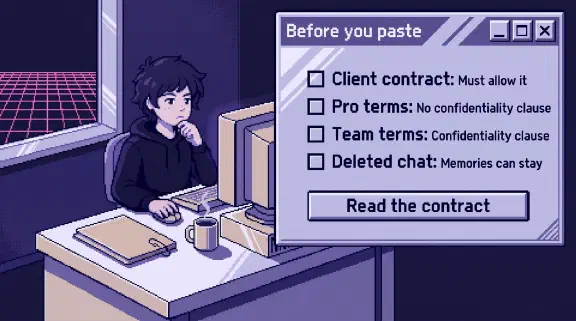
For whether a client’s contract allows this, see Can I Put Client Data Into Claude?
Is Claude Code safe to install?
Yes, and each release has a signed manifest with checksums. The bigger risk is falling behind. Its GitHub repo lists 36 security advisories, 29 rated high. Native installs update themselves. Homebrew, WinGet and Linux package managers don’t by default.
Is Claude Code safe for work or enterprise use?
Yes on a company seat with settings pushed to everyone, and I’d say no on personal accounts. Zero data retention is for qualified Enterprise accounts, and a personal login falls outside it. For healthcare, the BAA path needs Enterprise too.
For a 10-person company, I’d go in this order:
- Use company seats only, one per person.
- Push settings from the admin console. Turn off bypass, and decide whether auto mode stays.
- Turn on the sandbox with credentials blocked, and put Windows users on WSL2.
- Keep work in a git repo so changes can be undone.
- Write one hook for the thing that must never happen.
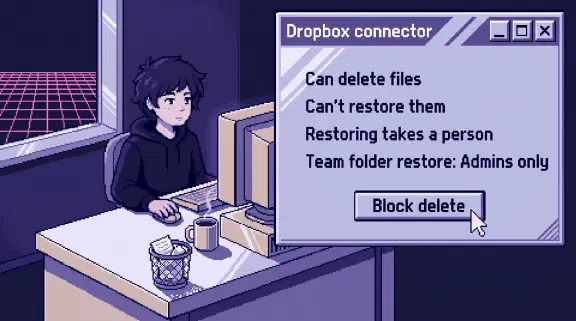
- Scope connectors separately. Anthropic “does not security-audit or manage any MCP server.” Use the table of what 33 connectors can change and the one-page connector policy.
What I couldn’t confirm
- Whether 17% still describes today’s classifier. It’s from March, on 52 actions.
- How long Team sessions are kept. The data page says 30 days, and the privacy article says sessions are retained “in the product.”
- Whether a shell command reading outside the folder triggers the first-read question. The docs name only Read, Grep and Glob.
- Which mode the Desktop app’s Code tab starts in when nothing is set.
- Whether a Team owner can see inside a session on someone’s laptop. The analytics page lists usage numbers and a leaderboard and doesn’t say.
Should I install Claude Code?
Yes, if someone will own the settings above. Keep it off company files until they do.
If you’d rather plan which of your tools to connect, and how, the setup planner asks six questions and gives you a plan without asking for an email. If you want a second look at your setup, bring it to a 30-minute call.