Is It Safe to Connect Claude to Notion?
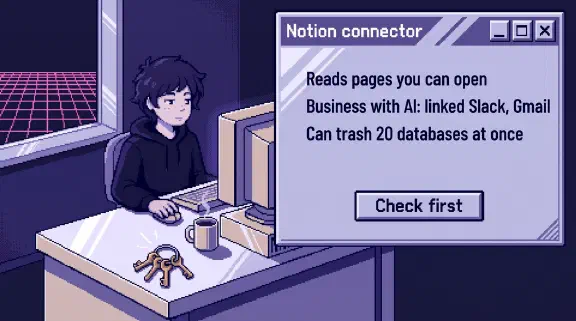
Safe enough, if you first check what your Notion is connected to. On Business or Enterprise with Notion AI, your connection can search whatever your workspace has linked, such as Slack, Gmail, Google Drive and GitHub. Notion’s docs also list tools that trash whole databases and change calendar events, which may notify people.
Notion is our project tracker and document store. Our setup reaches it through API keys. I haven’t tested this connector. What I say about it comes from public pages I read on October 31, 2026.
The listing in Claude’s directory has 13 tools, and none of them mention deleting, calendars or other apps. Notion’s own tool docs name 25 more that change something or start an agent, and more that read. The listing and Notion’s connection guide give the same server, https://mcp.notion.com/mcp. The table of what 33 connectors can change compares it with your other apps.
Can Claude access your Notion pages?
Yes, everything your account can open. Notion says “MCP tools act with your full Notion permissions” and “can access everything you can access.”
That’s more than Notion’s API gives by default. When we ran a sync job read-only, 19 of our 36 databases returned “not found”, because an API integration only sees pages someone shared with it. A connector has no such wall.
So the account matters. A workspace owner’s connection reaches far more than a member’s in two teamspaces. Everything old reaches Claude too. When we inventoried our Notion documents, the status field was blank on 76 of 90 rows, and a row titled “(stale)” was still searchable like any other page. Claude can read that page and answer from it with a straight face.
Does connecting Notion also connect Slack and Gmail?
Yes, on Business or Enterprise with Notion AI, if your workspace set up AI Connectors. Notion’s Help Center says an AI app connected this way “can search your connected sources, such as Slack, Google Drive, and GitHub,” and adds: “The content goes to the AI app you connected, such as Claude or ChatGPT, and that app’s own terms apply to it.”
The tool docs describe two steps. notion-connector-search searches sources “such as Slack, Google Drive, GitHub, Jira, mail, and calendar,” with a window that can be “all_time”. Then notion-fetch opens the full item from most of them, including Slack, Google Drive, GitHub and Gmail.
- Someone else may have turned it on. A workspace owner sets up these connectors for Notion AI, and they keep working after that owner leaves. The person clicking Allow in Claude may have no idea they exist.
- Private messages can be in it. Members can connect their own private channels and DMs to Notion. Each person only sees what they can already see in Slack, and each person’s Gmail search covers only their own inbox. That protects coworkers from each other. It does nothing about the content leaving for Claude.
- Your Claude settings for those apps don’t cover it. In Claude, tool settings sit on each connector. If you followed my Slack post and blocked
slack_read_channel, that setting lives on the Slack connector, and this route runs through the Notion connector.
On Free or Plus this route isn’t there, because connector search needs “Business or Enterprise with Notion AI.” To see what’s connected, go to Settings, then Notion AI.
Can Claude delete Notion pages?
Yes, by Notion’s docs, even though the listing shows no delete tool. notion-delete-pages moves as many as 20 pages to Trash and notes that “Database rows are pages.” notion-delete-databases moves as many as 20 databases “with all of their rows.” Locked pages and databases can’t be trashed, so lock the ones you can’t lose.
Notion built a brake. “The call must set user_confirmed: true,” and the tools are marked destructive “so MCP clients that honor tool annotations ask before running it.” The client making the call sets that flag, so treat it as a prompt to ask a person, and set your own approval on top.
Trash keeps pages for 30 days by default, so trashing is the recoverable case. Overwriting worries me more. notion-update-page has a replace_content command. notion-update-data-source changes a whole database, and for status and select fields it says “list every option to keep. Omitted options are removed.” Your way back is version history, which lasts 7 days on Free, 30 on Plus and 90 on Business, and Notion warns it “won’t capture every single change.”
Bad writes also come in bulk, and a person approving them won’t fully save you. Our own AI created 1,042 tasks in four months with a human gate in front of every batch. One person ended up with 243 active tasks, 182 of them untouched since the AI filed them.
Can Claude contact people through Notion?
Yes, by Notion’s docs, through the calendar. If you’ve connected a calendar to Notion, the calendar tools can create, update and cancel events, and the docs say each “may notify attendees.” They’re available “on all Notion plans” on connections a person authorized, so this one doesn’t need Business.
A cancelled meeting with a customer is a message to that customer. notion-calendar-list-coworkers-events also “Reads detailed events for coworkers in the same organization”.
The docs also list notion-spawn-session and notion-send-message-to-session, which start and message Notion’s Custom Agents.
Can a Notion page trick Claude?
Yes. Notion’s security page says “An attacker could put a malicious instruction in content that your MCP client reads,” and that a client following it “could disclose data or change content without your intent.” It tells you to “Treat content returned by tools as untrusted.”
Anthropic’s Cowork safety page says these attacks need two things at once: “Claude can read information outside your trusted boundary, and can perform actions that could compromise the user.” A Notion connection with connected sources can meet both. Anyone can email you, and that email can come back through a Gmail search into a session that can also edit pages and cancel meetings. Slack Connect adds people at other companies: for Notion AI, Notion says “there isn’t a way to leave Slack Connect channels out of these real-time results.”
Who can connect Claude to your Notion?
Any member, unless you’re on Enterprise. Notion MCP works on every plan, and limiting which clients members can connect “needs the Enterprise plan.” Guests can’t connect, which helps if you keep contractors as guests.
On the Claude side of a Team or Enterprise plan, an owner enables the connector, and then, in Anthropic’s words, “Each person still needs to authenticate individually before they can use it.”
Logs are thin below Enterprise. Audit logs are for Enterprise owners, and even there Notion says “Detailed visibility into which users are using each tool is not yet available.” What you get on a page is history: notion-get-version-changes lists who made each change, “including edits from Notion AI, Custom Agents, and MCP clients,” as far back as your plan keeps it.
Does Claude train on your Notion data?
Not by default on Team or Enterprise. Anthropic says “we will not use your inputs or outputs from our commercial products,” unless you send feedback with the thumbs buttons.
On personal plans it’s a setting you choose. Training data “does not include raw content from connectors,” though it may include what’s “directly copied into your conversation”. Notion’s promise not to train on your data covers Notion’s own processing. Once content reaches Claude, “that app’s own terms apply to it.” I’d keep company workspaces on company plans.
How do I connect Claude to Notion safely?
- Check Settings, then Notion AI. Learn which apps are connected before anyone connects Claude. Disconnect what nobody uses.
- Keep broad accounts off it. Each person connects with their own access, so start with a member who sits in a few teamspaces and leave the workspace owner for last.
- Have an owner set the tools in Claude, using the table below. The listing and Notion’s docs use different names, so match them by what they do. Treat anything you don’t recognize as a write until you’ve read it.
- Test it. Post a made-up sentence in a private Slack channel you’ve connected to Notion, wait out the three hours Notion can take to index it, then ask Claude to find it with only Notion turned on. Then ask it to trash a throwaway database, and to cancel a test event with only you on it.
- Write down who connected, and read the listing again every few months. It warns that “Anthropic does not control which tools developers make available”.
| Tool | Setting | Why |
|---|---|---|
notion-connector-search | Blocked | Reaches Slack, mail, Drive and the rest |
notion-delete-pages, notion-delete-databases | Blocked | Trash as many as 20 at a time |
notion-calendar-create-events, -update-events, -cancel-events | Blocked | May notify attendees |
notion-calendar-list-coworkers-events | Blocked | Reads coworkers’ detailed events |
notion-spawn-session, notion-send-message-to-session | Blocked | Start a second agent inside Notion |
notion-update-page, notion-update-data-source, notion-move-pages | Needs approval | Overwrites are harder to undo than deletes |
notion-create-pages, notion-create-comment | Needs approval | Other people see them |
notion-search, notion-fetch, notion-get-comments | Always allow | Reading Notion, within that person’s access |
What I couldn’t confirm
- Whether Claude’s Tool permissions screen shows the docs’ extra tools, including connector search, calendar and delete, or only the listing’s 13. Step 4 answers it for your workspace.
- Whether blocking connector search closes the route.
notion-fetchopens a connected item from its URL, and Notion’s docs saynotion-ai-search“stays callable by name.” Removing the source in Notion is the sure way. - Whether Claude asks before trashing when nobody has set the tool.
- Whether Claude can use a workspace-owned connection, where an admin picks the tools from a set that leaves out delete and calendar. That would be the narrowest route.
- Whether an owner below Enterprise can turn Notion MCP off entirely. Notion’s overview points owners to Manage workspace clients without saying what it offers on each plan.
Should I connect Claude to Notion?
Yes, if someone looks at the connected sources first and sets the tools. Reading your own docs is the useful part, and its worst outcome is a confident answer from a stale page. If nobody will own the settings, wait. For the rules around it, use the one-page connector policy in the QuickBooks post.
If you’d rather plan which of your tools to connect, and how, the setup planner asks six questions and gives you a plan without asking for an email. If you want a second look at a list you already have, bring your connected apps to a 30-minute call.